
If you are new to driving, you might not have heard of a V5C before.
It can sound like a random mix of letters and numbers, but it is actually one of the most important documents connected to your car.
Understanding what it is and what it does will help you stay organised and avoid unnecessary stress.
What is a V5C?
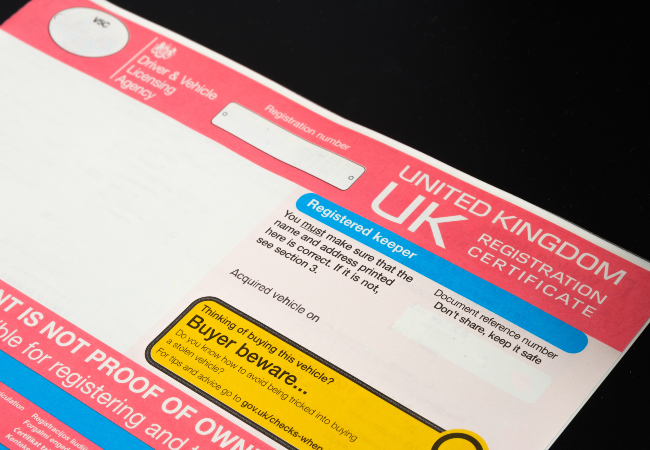
A V5C is your vehicle’s registration certificate, often called the logbook, though it’s not actually a book. It’s issued by the DVLA (Driver and Vehicle Licensing Agency).
The V5C shows the name and address of the registered keeper. It also includes information about the car, such as the make, model, colour, engine size, and registration number.
Bear in mind that this is not proof of ownership. It shows who is responsible for registering and taxing the vehicle, not necessarily who legally owns it.
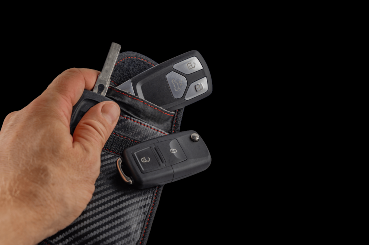
You should keep your logbook somewhere safe at home, like a filing cabinet. It should not be kept in your car, as this can increase the risk of fraud if the vehicle is stolen.
Why is a V5C Important?
Your V5C links you to the vehicle as the registered keeper. It allows the DVLA to contact you if needed.
It keeps a record of important updates, such as:
- Changes of address
- Vehicle modifications
- If you declare the vehicle SORN
- If you sell, scrap, or export the vehicle
Without an up-to-date V5C, simple tasks like taxing or selling your car can become more complicated.
What Does a V5C Look Like?
The V5C is a coloured paper document split into sections. Each section has a different purpose, such as confirming keeper details or notifying the DVLA of changes.
The document carries an 11-digit document reference number. This number is vital because it can be used to tax the vehicle online.
The document reference number appears in five places:
- On the front cover
- On the inside front cover
- In V5C / Section 2
- In V5C / Section 3
- In V5C / Section 4
V5C / Section 2 is the green new keeper slip. The seller gives it to the buyer when selling the vehicle, which allows the new keeper to tax the vehicle before the full logbook arrives.
V5C / Section 3 is used to notify the DVLA that you have sold or transferred the vehicle to a motor trader, insurer, or dismantler.
V5C / Section 4 is used to notify the DVLA of permanent export, confirming that the vehicle is leaving the country.
Because the document reference number appears in several places, you should keep the whole document secure and avoid sharing it unnecessarily.
Buying a Car
If you are buying a car, make sure the seller has the V5C and that their name matches the registered keeper details.
Check that the registration number, make, model, and colour on the V5C match the vehicle you are viewing.
You should be given the green new keeper slip from Section 2. This allows you to tax the vehicle straight away while waiting for the full logbook to arrive.
Be cautious if the seller does not have a V5C. It could indicate an issue with the vehicle’s history, and you should investigate further before purchasing.
Remember that vehicle tax does not transfer to you. Even if the previous keeper taxed the car, you must tax it yourself before driving it.
Selling a Car
If you sell your car, you must tell the DVLA straight away.
You can do this online or by completing the relevant section of the V5C. If you update it online, you will usually receive confirmation by email.
You should also receive confirmation that you are no longer the registered keeper. This protects you from being held responsible for the vehicle after you have sold it.
Give the new keeper the green slip from Section 2 and make sure the transfer is properly recorded.
When Must You Update Your V5C?
You must update your V5C if:
- You change your name
- You change your address
- You modify the vehicle, such as changing its colour, engine size, or registration number
- You scrap or export the vehicle
Updating your name or address is usually free.
If you do not tell the DVLA about changes, you can be fined up to £1,000.
What If I Lose My V5C?
If your logbook is lost, stolen, damaged, or destroyed, you will need to apply for a replacement.
You can apply online through GOV.UK for a fee of £25, and it usually arrives within 5 to 7 working days.
You can also apply by post using form V62, which usually takes between 2 and 6 weeks.
The replacement will be sent to the address the DVLA has on record.
Can You View Your V5C Online?
You cannot view a digital copy of your V5C online. It is a physical paper document.
However, you can apply online for a replacement if you have lost it.
Can You Tax a Car Without a V5C?
Yes, you can tax a car without the full V5C logbook. If you have recently bought the vehicle, you can use the green new keeper slip to tax it straight away.
If you do not have any part of the logbook, you can visit a Post Office branch that handles vehicle tax and complete a V62 form to apply for a replacement at the same time.
You will need to pay the £25 replacement fee while taxing the vehicle.
The Bottom Line
It might seem like just another piece of paperwork, but your logbook plays an important role in keeping your vehicle properly registered.
Store it safely at home. Keep it up to date. Tell the DVLA about any changes. Doing so will help you avoid fines, delays, and unnecessary stress as a new driver.