
In the modern automotive world, technology moves fast. One feature that has transitioned from high-tech fighter jets to the family SUV is the Head-Up Display, or HUD. If you are browsing for a new vehicle and wondering what is a HUD, you aren’t alone. It is quickly becoming one of the most sought-after safety and convenience features on the UK market.
In this guide, we’ll explore how it works, whether it’s worth the investment, and how you can get it in your next car.
What is a Head-Up Display?
So, what does HUD stand for? It stands for Head-Up Display. The name is literal: it allows the driver to keep their “head up” rather than looking down at traditional dials or screens.
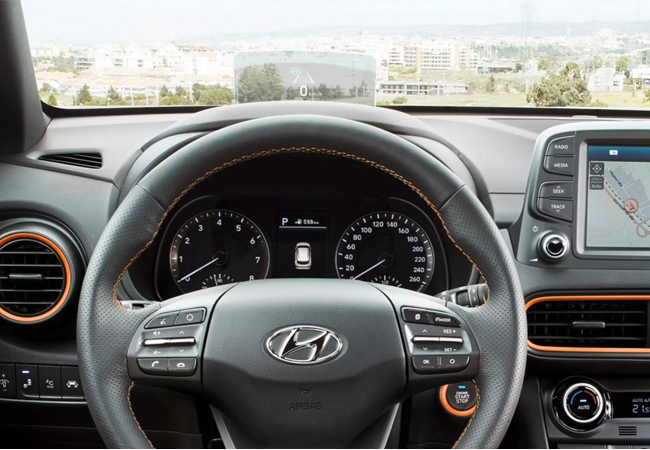
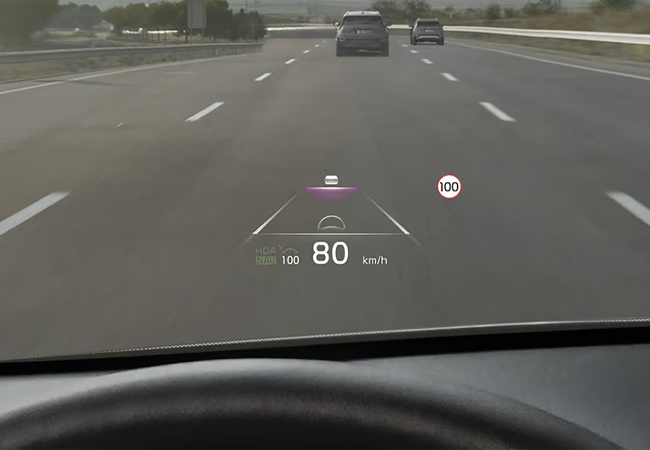
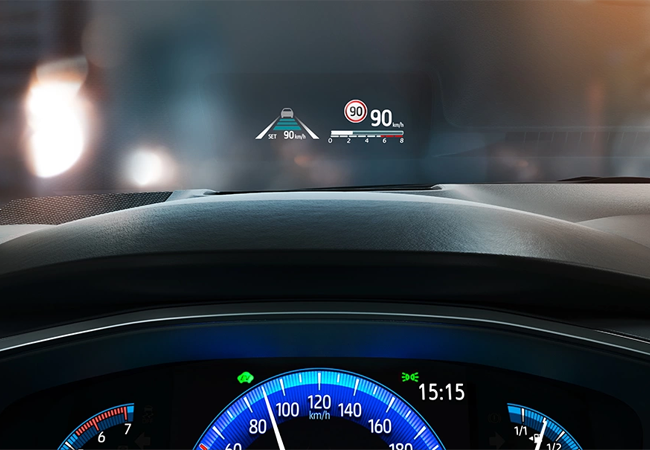
A Head-Up Display for cars projects key driving information, such as speed, navigation, and safety alerts, onto the windscreen or a small transparent screen in the driver’s line of sight.
The technology was originally developed for military aviation.
Pilots needed to see critical flight data and targeting information while keeping their eyes on the sky during high-speed manoeuvres. In cars, it allows drivers to see essential information without looking down at the instrument cluster. By bringing essential data into the periphery of your vision, it allows you to stay informed without ever taking your eyes off the road ahead.
How Does a Head-Up Display Work?
If you’ve ever wondered how does a head-up display work, it’s a clever bit of optical engineering. The system is integrated into the dashboard and projects information onto a specially treated section of the windscreen.
A projection unit creates the image. Mirrors and lenses reflect it into the driver’s line of sight.
The process happens in three main stages:
- The Projection Unit: An internal unit (often using LEDs or a small liquid crystal display) creates a high-contrast image.
- Optical Path: A series of mirrors and lenses reflect and magnify this image, projecting it upwards.
- The Display Surface: The image is reflected off the glass and appears to “float” a few metres in front of the bonnet, making it easy for your eyes to focus on both the data and the road simultaneously.
Factory-fitted systems typically require a specific windscreen.
One common question is: do you need a special windscreen for a head-up display? For factory-fitted systems, the answer is usually yes. Standard windscreens can cause a “ghosting” effect, where the image appears doubled. To prevent this, manufacturers use a specially treated section of glass with a wedge-shaped film sandwiched inside to ensure the image remains crisp and clear.
How to Use a Head-Up Display
Most systems are controlled through the vehicle settings menu or steering wheel controls. Once you have the tech, you need to know how to use a heads-up display effectively. Most modern systems are designed to be “set and forget,” but they offer plenty of customisation to suit different drivers.
How to turn the system on and off
You can usually find the toggle to activate or deactivate the HUD within the main infotainment screen. Look under “Vehicle Settings” or “Display.” Some cars feature a physical button to the right or left of the steering column.
Where to find the HUD settings
Settings are typically housed in the driver assistance or display menus. To identify it quickly, look for the dashboard icon—usually a small symbol of a car with vertical lines or a “projector” icon emanating from the dashboard area.
Customisation options:
Because everyone’s driving position is different, knowing how to adjust a heads-up display is crucial for comfort. Through the vehicle settings, you can typically:
- Adjust brightness: Increase it for sunny days or dim it for night-time driving.
- Change display height: Move the image up or down so it sits perfectly in your eyeline.
- Select which information is shown: Choose whether you want to see just the speed, or add navigation turns, speed limit signs, and lane-keep assist data.
Is a Head-Up Display Worth It?
When spec-ing a new car, you might ask: are heads-up displays worth it? Like any premium feature, there are pros and cons to consider.
| Pros | Cons |
| Keeps key information in your line of sight | Usually limited to higher trim levels |
| Reduces the need to look down | Can increase the overall vehicle cost |
| Easy to see navigation and alerts | Not all systems offer the same features |
| Adds a modern, premium feel to the cabin | Some drivers may find it distracting at first |
What Cars Have a Head-Up Display?
While once reserved for flagship luxury saloons, HUDs are now available across a wide range of segments. Several manufacturers offer cars with head-up displays, including:
- Hyundai & Kia: Often featured on their “Ultimate” or “GT-Line S” trims.
- Mazda: Known for including HUDs as standard on many mid-range models.
- Toyota and Lexus: Widely available on their hybrid SUV and luxury saloon ranges.
- Volvo and Polestar: Famed for clean, minimalist HUD designs that focus on safety and clarity.
If you are looking for your next vehicle, you can explore the latest models and configurations on our New Car Hub. This is not an exhaustive list, as the technology is rapidly becoming standard in many electric and premium vehicles.
Disclaimer:
- Accurate as of February 2026
- Reflects new cars currently on sale in the UK
- HUD availability depends on trim level and model year
- Always check the exact vehicle specifications before purchasing
- Some discontinued models, such as the Vauxhall Insignia, previously offered a head-up display
Can a Head-Up Display Be Added to a Car?
If you’ve bought a car without one, you might wonder: can a heads-up display be added to a car?
Head-Up Displays are usually available on higher trim levels or as part of an optional pack. For example, Ford offers it within a Driver Assistance Pack on selected models such as the All-Electric Ford Capri and All-Electric Ford Explorer.
Aftermarket Units
If a car does not have a factory-installed system, aftermarket units are widely available. These typically sit on the dashboard and connect through the OBD port or a smartphone app.
If you are learning how to install a heads-up display in a car, the process is relatively simple:
- Placement: Place the unit on the dashboard in your line of sight using a non-slip mat.
- Connection: Connect it to your car’s OBD-II port (usually found under the steering column) to get real-time speed data.
- Setup: Follow the specific setup instructions for your device, which may involve applying a small reflective film to the windscreen to prevent image ghosting.
While they aren’t as sleek as built-in versions, they are a cost-effective way to get the tech in an older vehicle.